
In fiber vs cable internet, one practical difference decides most comparisons: fiber usually gives a home the same fast upload speed as download speed, while cable is built to prioritize downloads. Both can stream 4K video and serve a busy household, but fiber is generally steadier at night, more responsive for real-time tasks, and far faster when data has to leave the house.
Fiber vs cable internet: which is the better connection?
At a similar price, fiber is usually the better choice when both are available. On a 300 Mbps fiber plan, a home can get 300 Mbps in both directions; even a 1 Gbps cable plan using DOCSIS 3.1 tops out at 35 Mbps upload, and many cable tiers provide 10–20 Mbps. For video calls, cloud backups, and large files, that gap matters.
When fiber is unavailable, when service is needed quickly, or when the only fiber choice starts at 1 Gbps and a household wants a 100–300 Mbps tier, cable remains a sensible option. For browsing and streaming, 100–200 Mbps cable can be enough. At many addresses, the street decides the choice: fiber passes about half of U.S. homes, while cable passes more than 90%.
What fiber-optic and cable internet actually carry
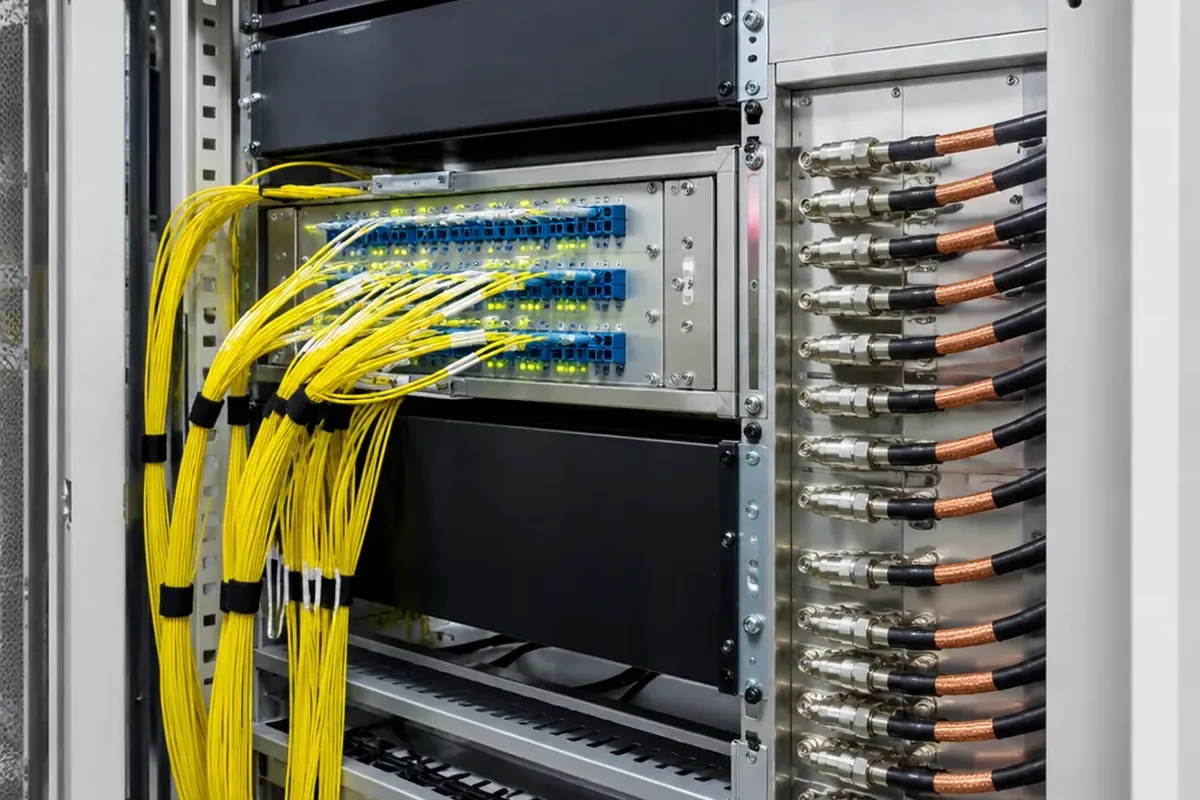
Fiber-optic internet sends data as pulses of light through glass strands thinner than a human hair. An Optical Network Terminal (ONT) at the home converts the light into electrical signals a router can use. A passive optical network can run tens of kilometers from the central office to the home without an active amplifier. In residential networks, GPON provides 2.5 Gbps of downstream capacity shared on a split, while XGS-PON provides 10 Gbps shared symmetrically.
Cable internet uses electrical signals over copper coaxial cable. In a Hybrid Fiber-Coaxial (HFC) network, fiber carries data through much of the route while coax handles the final stretch to homes. Coax typically needs a powered booster every few hundred meters. The network was built for one-way cable TV; the DOCSIS standard later added a return path so homes could send data back.
Fiber and WiFi solve different parts of the trip
Fiber does not replace WiFi. Fiber or cable brings the connection to the house, and WiFi uses radio signals to spread it around the home. An Ethernet cable can connect a device directly to the router without using WiFi at all.
Speed comparison: downloads do not tell the whole story
Common fiber plans range from 300 Mbps to 2 Gbps, and some markets offer 5 Gbps or 8 Gbps. Cable commonly sells 100–800 Mbps tiers, with the newest tiers reaching about 2 Gbps. The download figures look similar; upload capacity is where the two separate.
| Measure | Fiber | Cable |
|---|---|---|
| Example 300 Mbps plan | 300 Mbps down and 300 Mbps up | Uploads commonly 10–20 Mbps |
| Typical idle latency | 8–14 ms weighted median | 13–22 ms weighted median |
| Typical jitter | Under 3 ms | About 5–40 ms |
| Peak-hour speed reduction | About 3–5% | About 28–40% |
A 10 GB video project makes the difference concrete. On a 300 Mbps cable plan with 15 Mbps upload, sending it takes about 95 minutes. On a 300 Mbps fiber plan, it takes under five minutes.
That does not mean every home needs multi-gigabit service. One 4K stream needs about 25 Mbps, and even a house full of active users rarely goes above 200 Mbps of download demand. Beyond roughly 400 Mbps, extra download speed mostly looks good on a spec sheet. Upload speed and consistency tell you more.
Why latency and evening congestion can change the experience
Latency is the time data needs to travel between two points. On the last mile, fiber typically measures 3–8 milliseconds, compared with 10–25 milliseconds for cable. In the FCC’s weighted median idle measurements, fiber falls in the 8–14 ms range and cable in the 13–22 ms range.
Jitter is how much that delay varies. On fiber, it is typically under 3 ms. Cable jitter can swing from 5 ms in the morning to 40 ms in the evening, enough to make a video call sound robotic or uneven.
A crowded cable node is a shared local pool
A cable node typically serves 500–2,000 homes from one fixed capacity pool. Between 7 and 11 PM, more people stream, game, and upload at once, so cable speeds can fall 28–40%. Fiber is also shared, typically across 32 or 64 homes on a split, but its 2.5–10 Gbps pool almost never saturates, so the peak-hour drop is usually only 3–5%.
Picture a household at 8 PM streaming 4K video, taking a video call, and uploading a work file. The download side copes easily, but the video call and the upload share a cable upload tier of often only 10–20 Mbps, and the node’s whole upload pool is small. Fiber’s symmetric capacity gives both far more room.
Reliability is about weather, power, and how failures appear
Rain, humidity, and electrical storms do not affect fiber, because it carries light through glass. Buried fiber also avoids most wind and ice damage. A falling tree, ice storm, or construction backhoe can still cut a fiber line. The failure is then usually all or nothing, and repair typically happens within a day.
Cable has different weak points. Water in loose outdoor connectors, cracked coax, and flooded street cabinets can add noise that slows service or causes dropouts. Extreme cold can crack copper lines. A corroded splitter or a neighbor’s faulty modem can cut cable speeds by 80% without a full outage, which makes the problem harder to find.
Cable also depends on powered street amplifiers, so a wider power outage can take it down even when your home still has electricity. Fiber needs power at home for the ONT and router; a UPS battery backup for about $80–120 keeps them running during a home outage.
Fiber uptime averages 99.9% or higher in reported measurements, compared with 99.5–99.8% for cable. That gap is only one or two hours a month, but cable disruptions tend to hit during peak evening use, when shared nodes are under the most stress.
How to choose the right plan for your household
- Choose fiber when it is available and within about $10 per month of comparable cable, especially for remote work, frequent video calls, large uploads, content creation, or multiplayer gaming.
- Choose cable when fiber is unavailable, installation must happen the same week, or a 100–300 Mbps tier better matches your needs than a fiber provider’s starting 1 Gbps option.
- Test a suspected cable slowdown at 10 AM and 9 PM on three weekdays. If evening speed is consistently more than 20% below morning speed, the cable node is likely congested.
Cable is not obsolete. DOCSIS 4.0 expands the usable spectrum and can enable up to 25 Gbps of aggregate downstream capacity over existing HFC lines. That is capacity for the whole network, not a speed for one household, and the top tiers are available only in a handful of metro areas.
Common myths that blur the fiber and cable decision
Fiber does not automatically make WiFi fast
Fiber raises the speed available to the household, but the router’s location, radio band, and your devices decide how much reaches a wireless device. WiFi 6E and WiFi 7 can use the 6 GHz band, yet airtime sharing still reduces real throughput.
Cable internet does not require cable TV
No. Cable TV and cable internet share the same coaxial lines but are independent services. Internet-only plans are available, and canceling TV does not interrupt cable internet.
A fiber-rich network is not necessarily fiber to the home
A “fiber-rich” label often means fiber exists somewhere in the network backbone while coax still serves the home. An ONT and nearly equal upload and download speeds are stronger signs of genuine fiber-to-the-home service.
Frequently Asked Questions
What are typical DSL speeds?
DSL downloads range from 1 to 100 Mbps and uploads from 1 to 20 Mbps; most residential plans offer 10–50 Mbps download. Typical DSL latency is 25–50 ms. Each customer gets dedicated bandwidth, so neighbors do not slow you down, but speed falls sharply as the copper line gets farther from the central office.
Is fiber better than WiFi?
They are not competing technologies. Fiber is the wired connection from the provider to your home; WiFi is the wireless link from your router to your devices. Fiber determines the household’s potential speed; WiFi determines how much of it reaches a device.
What is fiber-optic internet?
Fiber-optic internet transmits data as light signals through thin glass or plastic strands. An ONT at your home converts the light signal for the router. ISPs use single-mode fiber for long distances and multi-mode fiber for short in-home connections.
How do I tell if my internet is fiber or cable?
A small white or gray ONT box mounted on the wall is a sure sign of fiber. A modem connected with a round threaded coaxial cable means cable. Upload speeds close to download speeds also point to fiber, and a modem labeled DOCSIS or cable modem points to cable. The FCC National Broadband Map shows reported availability at an address, not the active service on an account.
What is the downside to fiber internet?
Availability and installation are the primary drawbacks. Fiber passes about half of U.S. homes, installation requires a technician visit, and lines can be cut by falling trees, ice storms, or backhoes. During a power outage, the ONT and router need a UPS to keep operating.
Do I need both cable and internet?
No. Cable internet and cable TV are separate services riding on the same coaxial infrastructure. Providers offer internet-only plans, which are often the best choice if streaming services already cover most viewing.